We probably all have spare batteries lying around the house ready to use in the TV remote or the kitchen clock, but how long have they been there for? Are they still in date and useable? After all, there’s nothing worse than finally getting round to using your spare batteries and realise they’ve reached their shelf life and no longer work. Thanks to updated technology, many batteries now hold their power for longer even when not in use, so you might be in luck!
Improved battery technology

Batteries now have the capability to preserve their power for longer, even when they’re just sat in a drawer. Duracell introduced its 10-year Power Preserve, meaning batteries within this range should preserve their power for up to 10 years. This can be very helpful if you tend to keep a few spare batteries in the house. Other improved battery technology can also help your batteries to last longer, such as anti-leakage. Reducing the risk of damage or even rupture, advanced technology and features can improve the life and safety of your batteries. Despite this, you should still ensure you test your batteries properly to make sure they can still be used.

Testing your batteries

If you have loose batteries in the house, or you’re not sure how long ago you bought them, the best way to know if they’re in working condition is to test them. You may have seen online that you can test your battery by dropping it on to a hard surface. We do not recommend this, and instead you should use a battery tester.
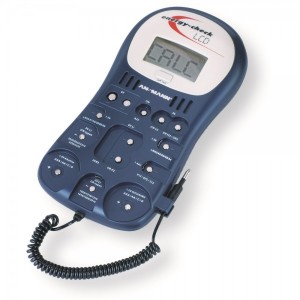
battery tester
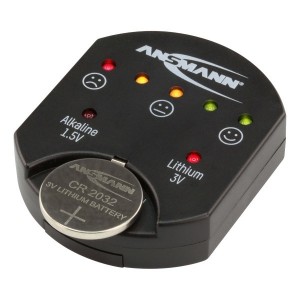
This can save you from keeping any dead batteries in the house, and knowing which of your spare batteries can be used. Keeping a battery tester in your home is helpful and it’s a very easy device to use. A tester can check the energy levels of your batteries and will tell you if they still have charge, or if they need replacing. To test your batteries, you need to place the battery on the corresponding part of the tester; likely to be a little battery slot or a pin-type instrument. Most battery testers will have different coloured LED lights or an LCD display screen to tell you the state of the battery. Some testers will also detect the voltage of your batteries too.
testing your batteries
Check the compatibility of your battery tester before testing any batteries. Most will test alkaline batteries like AAA or AA, as well as lithium or alkaline coin cells.

Tips for testing your batteries

Using a battery tester is an effective and safe way of making sure your batteries will work. Ensure the terminals are clean, both on the battery and the tester itself, otherwise you may not receive an accurate reading. Bear in mind that a brand new battery may not test properly straight away, so try it again if this happens. Your battery tester may show an error message; this usually happens because of an incomplete measurement. Make sure the battery is on the tester properly and for the correct amount of time. If you still see error messages, it could be that the battery is so discharged that the tester simply doesn’t recognise it. For further information on anything battery-related, don’t hesitate to get in touch with us!